Dash Cam Draining Your Car Battery? How to Fix It
A hardwired dash cam that runs in parking mode pulls a small, steady current from your car battery. In most cars this is not a problem, but the wrong settings or a battery that is already weak can lead to a dead battery. Here is how to diagnose and fix it.
We may earn a commission if you buy through links in this guide, at no extra cost to you.
Parking recording needs battery protection
A dash cam can record while parked only when its wiring kit is configured to shut the camera down before the vehicle battery gets too low. The important decision is the low-voltage cutoff, not simply whether the camera turns on.
Why this happens
Dash cams with a hardwire kit (rather than a cigarette-lighter plug) are wired directly to the car’s constant-power circuit so they can keep recording while the car is off, for parking mode and impact detection. That means the camera draws a small amount of power even with the engine off. Most hardwire kits include a low-voltage cutoff switch specifically to prevent this from draining the battery too far.
Step 1: Check the low-voltage cutoff setting
Hardwire kits typically offer multiple cutoff voltage levels. A common setup has four options, roughly 11.8V, 12.0V, 12.2V, and 12.4V (car batteries), the lower the cutoff voltage, the longer the camera keeps recording before it shuts off, and the more of the battery it uses. The higher cutoff voltage is the safer setting: it makes the camera stop recording earlier, before the battery is drawn down very far.
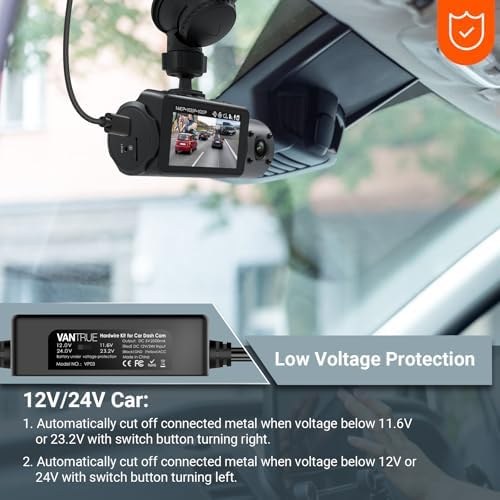
If your dash cam keeps draining the battery, the fix is usually simple: move the cutoff switch to its highest voltage setting (commonly labeled around 12.4V for a standard car battery), which tells the hardwire kit to stop recording sooner and stop pulling power from the battery earlier.
Step 2: Verify the wiring is connected correctly
Hardwire kits typically use three wires, and getting them backward is one of the most common causes of unexpected battery drain:
- ACC (accessory) wire should connect to a circuit that loses power when the car is off, so the camera knows the car is parked.
- Constant/battery wire should connect to a circuit that stays powered even with the car off, which is what lets parking mode work at all.
- Ground wire should connect to a solid metal ground point.
If the ACC wire is accidentally connected to a constant-power source instead of a switched one, the dash cam may not correctly detect when the car is parked, which can lead to it running parking mode for longer than intended.
Step 3: Set a shorter parking-mode timer
Many dash cams and hardwire kits let you set a maximum parking-mode recording time (for example, 2 hours) in addition to the voltage cutoff. Setting a timer adds a second layer of protection so the camera cannot run indefinitely even if the voltage cutoff is set low.
Step 4: Rule out other parasitic drains
Before assuming the dash cam is the cause, temporarily turn off parking mode entirely (through the camera’s settings) for a few days and see if the battery drain stops. If your battery still drains with parking mode off, another device (an alarm system, a phone charger left plugged in, an aftermarket stereo, or a battery nearing the end of its life) may be the real cause, not the dash cam.
Step 5: Check your battery’s actual health
A healthy, fully charged 12V lead-acid car battery should read roughly 12.6 to 12.8 volts at rest (engine off, several hours after driving). If your battery is already reading closer to 12.2 volts or lower at rest even without a dash cam installed, the battery itself may be aging or undercharged, and a dash cam pulling even a small parking-mode current can be the difference between starting fine and not starting. A cheap multimeter or a garage battery test can confirm whether the battery itself needs attention.
| Resting voltage (engine off, several hours) | Approximate charge level | What it means |
|---|---|---|
| 12.6V-12.8V | ~90-100% | Healthy, fully charged battery |
| 12.4V | ~60-75% | Partly discharged, will usually still start the car |
| 12.2V | ~50% | Weak; recharge soon to avoid battery damage |
| Below 12.0V | Well under 50% | Battery is significantly discharged; test or replace |
Voltage levels are approximate and vary somewhat by battery type and temperature. Use them as a general guide, not an exact diagnosis.
What if the problem continues?
If you have set the cutoff to its highest setting, confirmed the wiring is correct, added a parking-mode timer, and the battery still drains, the hardwire kit itself may be faulty, or your battery may simply be too weak to support any additional parasitic draw. At that point, replacing the hardwire kit or having a shop test the battery and charging system is the next step.
Recommended dash cams with reliable parking mode
If you are shopping for a new dash cam and want one with dependable parking-mode hardwire support out of the box, these are solid picks:

Viofo A329S 2CH Dash Camera
Front and rear 4K/2K recording with a well-regarded hardwire kit and clear voltage-cutoff dial, a common recommendation for dependable parking mode.

Redtiger F7N Plus Dash Camera
Budget-friendly front/rear dash cam that includes a hardwire kit option with a standard multi-level cutoff switch.
See our full Best Dash Cameras guide for more picks across price points, and check current Car Gear deals for live discounts on dash cams and hardwire kits.
Helpful gear for this fix
A dedicated tire pressure gauge won’t help here, but a portable jump starter is worth keeping in the car as backup while you sort out a parasitic drain issue, see our Noco Boost Plus GB40 pick from our jump starter guide, or browse current Car Gear deals for more options.
FAQ
Will turning off parking mode completely stop the battery drain?
Yes. If parking mode is off, the camera only draws power while the car is running, the same as any other accessory. This is a good way to test whether the dash cam is actually the cause of a battery drain before troubleshooting further.
Is it safe to leave a dash cam hardwired all the time?
Yes, as long as the hardwire kit’s voltage cutoff is working correctly. The cutoff switch is specifically designed to disconnect the camera before the battery is drawn down to a level that would prevent starting.
Can a dash cam actually damage my car battery?
A properly functioning hardwire kit with the cutoff working should not damage a healthy battery, since it stops well before the battery would be deeply discharged. Repeatedly deep-discharging any lead-acid battery, from any cause, can shorten its lifespan over time, which is why the cutoff feature and a shorter parking-mode timer matter.
Sources and accuracy note
Cutoff-voltage guidance and wiring troubleshooting steps are based on published manufacturer support documentation for dash cam hardwire kits (voltage cutoff levels, wiring roles, and troubleshooting order). Battery resting-voltage-to-charge-level figures reflect standard, widely published 12V lead-acid battery reference data. This guide describes general troubleshooting steps and is not a substitute for your specific dash cam or hardwire kit’s manual, or a professional diagnosis if the problem persists.